
AI customer profile: what to remember about every caller
· Updated
A customer calls for the third time, and the rep again asks what they already explained. The Leksta AI customer profile collects the key facts about a person from past calls and shows them before the conversation.
In short: the AI customer profile is a short summary of each contact that AI writes from past calls. It covers communication style, price sensitivity, objections and preferences, and every trait has a quote from a call. Next to it are the next step and open promises. It is part of speech analytics and is coming soon to Leksta.
Why a rep needs a customer profile
Recordings and transcripts keep everything, but nobody replays them before a call. A rep opens the contact card and sees a phone number, not a person.
It hurts most when a customer moves from one rep to another. The new rep does not know what was agreed, what was promised and what the customer disliked last time.
The profile fixes this in seconds: open the card and know the customer.
What the AI customer profile contains
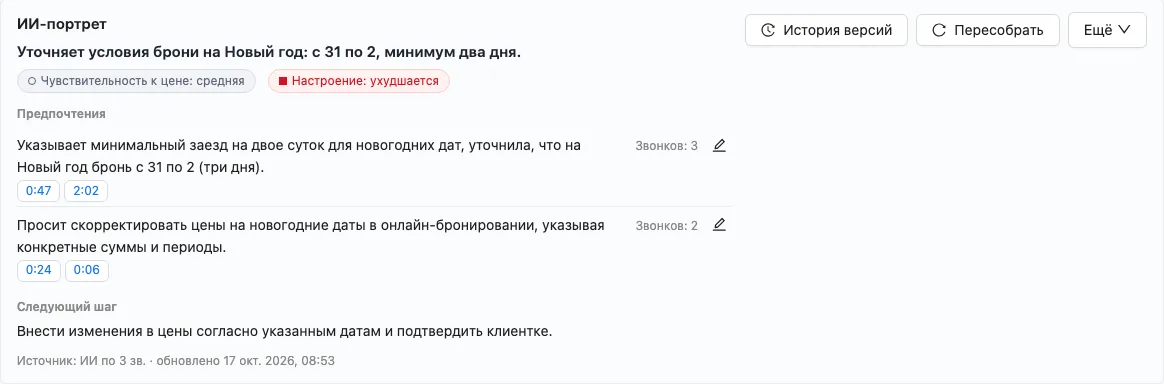
- A headline. One line on what the customer wants right now.
- Customer traits. How they communicate, how sensitive they are to price, which objections they repeat, what they prefer.
- A quote for every trait. Each finding links to the exact moment in the recording. No quote, no trait.
- Next step and promises. What to do next and which promises are still open.
Where reps see the profile
The profile appears where it is needed:
- in the contact card;
- on the call page;
- during a live call;
- in the click-to-call window before dialling;
- in the recipient list of a call campaign.
The profile updates itself after every analysed call. A manager can hide or edit a trait with a reason, and the version history shows how the profile changed.
The profile in amoCRM and Bitrix24
The profile can be sent to amoCRM or Bitrix24 as a note or into a card field. By default nothing is sent to the CRM until an admin chooses what to send and where.
This way reps who work in the CRM see the customer profile next to the deal. More on sending call results: speech analytics.
What the profile does not collect
- The profile is off by default: the company decides whether to turn it on.
- Only the customer's behaviour in calls goes into it.
- A filter removes sensitive topics: health, religion, politics, ethnicity, credit.
- If a customer asks not to be called again or withdraws consent, the profile is deleted, including its copy in the CRM.
Who the AI customer profile is for
| Who | Why |
|---|---|
| Sales teams with repeat customers | Stop asking what the customer already said and keep promises in view |
| Customer service | See the customer's history before they start explaining again |
| Managers | Hand a customer over to another rep without losing agreements |
When the AI customer profile comes to Leksta
The AI customer profile is part of Leksta speech analytics and is coming soon. For now it works only with conversations in Russian. Leave a request and we will tell you when it launches.
FAQ
Where does the AI get information about the customer?
Only from your calls with that customer. The AI reads the transcripts and writes down traits that the customer's own words confirm. If there is no matching quote, the trait does not go into the profile.
Can a manager correct the profile?
Yes. A manager can hide or edit a trait and give a reason. All changes are in the version history, and the profile updates after every new analysed call.
Is the profile sent to the CRM automatically?
No, not until an admin turns it on. In the settings the admin chooses whether to send the profile to amoCRM or Bitrix24, and how: as a note or into a card field.