
Summary and outcome
A short summary and the result in the record timeline.
Calls come from your telephony, and the outcome of every conversation goes back to the customer record. We do not sell a PBX and we do not charge per seat.
Already a customer? Log in
Updated
Yes. Leksta connects to A1 VATS, FreeSWITCH, Asterisk or your carrier's SIP trunk, so your phone number stays the same. After each analysed call the summary, outcome and lead score land in Bitrix24 or amoCRM. Other systems receive events through signed webhooks, including via n8n.
Calls from your telephony go to AI analysis on their own: transcript, score, verdict and a CRM entry.
 beta
beta beta
beta beta
beta"Beta" means it works on test data and we are waiting for the first customers for a live check. Need another PBX - write to us.
An admin connects the A1 VATS account right in the console and employees are pulled in automatically. Recording, transcription and AI analysis are switched on per employee and per line. A live call shows up in the log with an Active status.
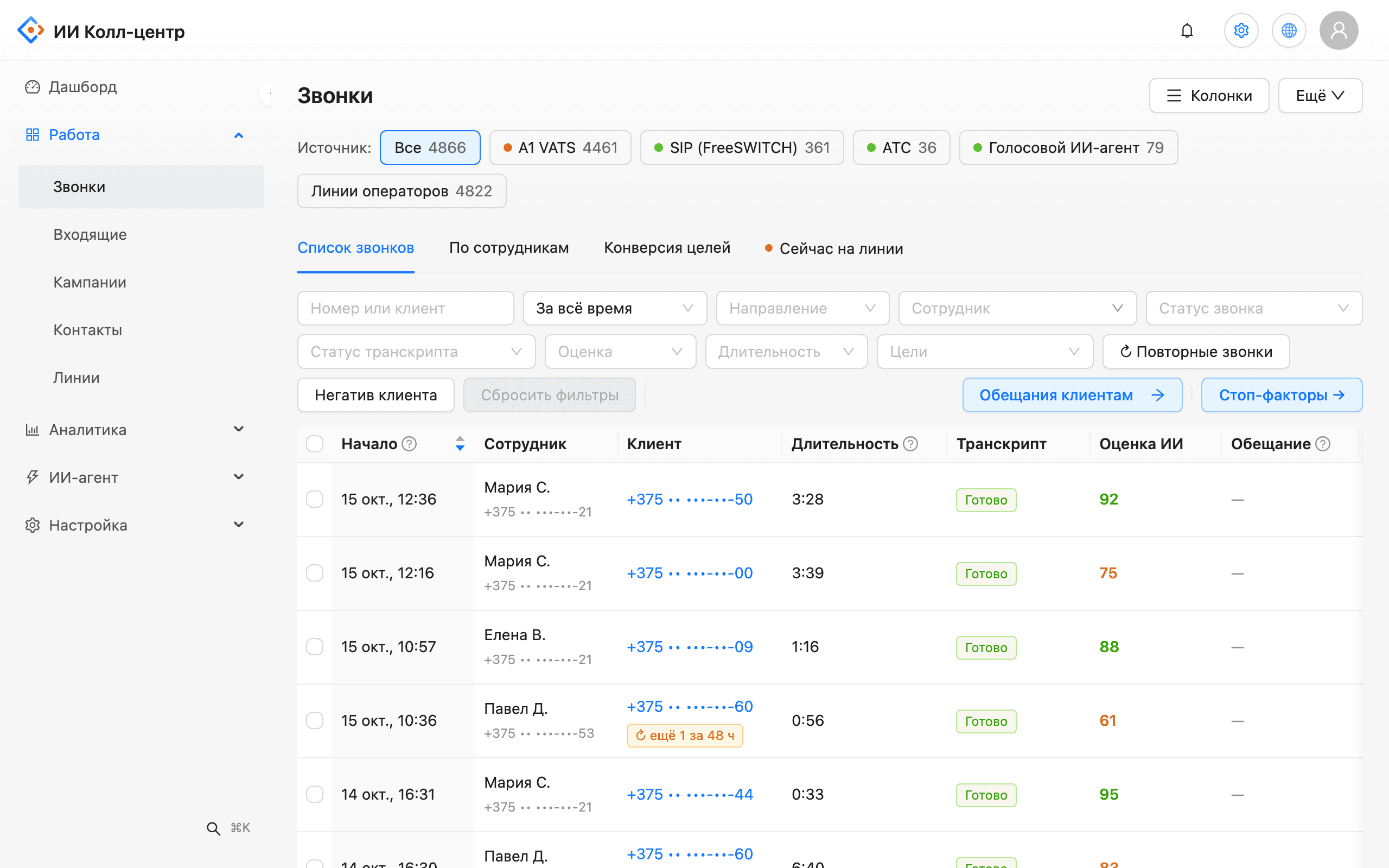
After analysis the CRM receives a finished result, not just a recording: a short summary, the outcome, a lead score and a link to the audio. The call is matched to the customer by phone number, including Belarusian +375 and 80 formats, without duplicate contacts.
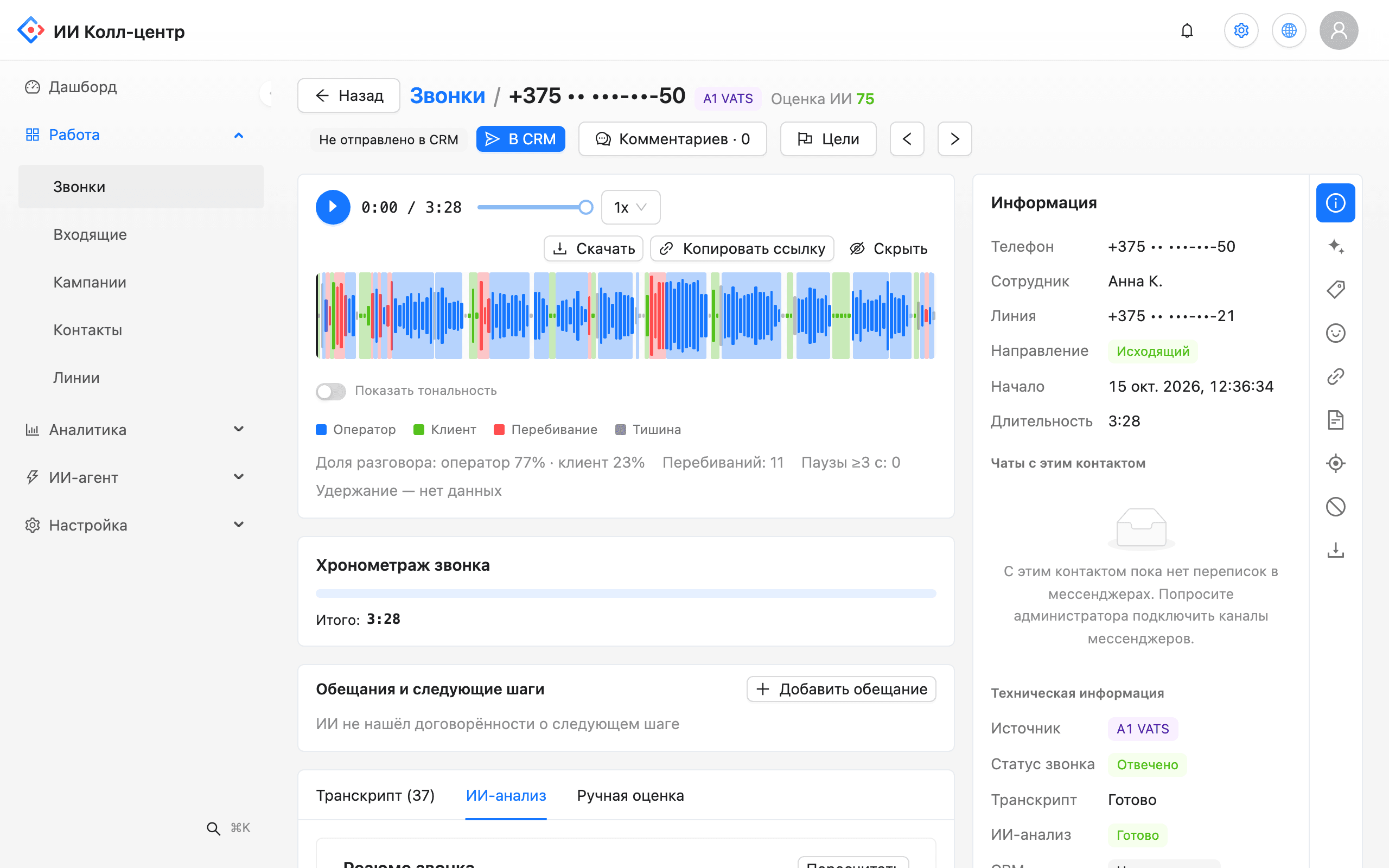
Extra CRM actions are off by default: you turn on only what your process needs.
A short summary and the result in the record timeline.
Scorecard result and lead qualification next to the recording.
Caller sentiment only, never the employee's emotions.
A task for a missed call or for reviewing a low-scoring call.
Call analysed, lead scored, alert triggered, agent requested, campaign call completed.
Admins create and revoke keys; the full key is shown only once.
We validate the connection in the demo and the pilot. Timing depends on your PBX and access to it.
A1 VATS connects in the console. For Asterisk or FreeSWITCH we provide ready SIP trunk config.
Turn on recording, transcription and AI analysis where you need them.
Connect Bitrix24 or amoCRM under Integrations and test the connection there.
Pick the pipeline, stage and fields for AI results.
Enter a URL, get a signing secret and choose events. There is a ready preset for n8n.
Yes. You connect the A1 VATS account in the console to receive calls, recordings and transcripts, and you can import history. Recording, transcription and analysis are switched on per employee.
No. The AI works on your number through your PBX or SIP trunk. We do not sell telephony; we connect to what you already have.
There is ready SIP trunk config for Asterisk with encryption. The integration is in pilot status: we validate the connection and call flows together on your system. Our blog post on PBX setup walks through the steps.
A note with the summary and outcome, a lead score and a link to the recording. Depending on settings, a lead or deal and a missed-call task are created. The call is matched to the contact by phone number.
Yes, as a pilot on a test database: each conversation creates a Phone call document on the contact. Before touching a production database we validate everything on your test copy.
No. The call is matched to the customer after the conversation, and the result is written to the CRM then. The voice bot recognises a returning caller from call history in the console.
Yes, through signed webhooks. Every event is signed with a secret, failed deliveries retry automatically and a log shows the status of each one. There is a ready preset for n8n.
Not yet: the external CRM receives call results. The customer's chat and call history is visible in the console, in the customer panel next to the conversation.
We will test the connection in a demo and outline pilot steps for your telephony and CRM.