
Call transcription: how to work with call transcripts
· Updated
Sales reps hold dozens of conversations a day, while a manager has no time to listen to all the recordings: an hour of recording takes an hour to hear. Text is faster to read and lets you search for a word. Call transcription turns recordings into working material for quality control, training and disputes with customers.
Why sales teams need call transcripts
A recording is fine while you need one call. When you want to know what customers say about price, how a rep answers an objection or which competitor comes up most, listening to recordings back to back is slow and imprecise. Text solves three problems:
- Speed. You read a conversation in minutes instead of listening for half an hour.
- Search. You find the word in the text instead of scrubbing a timeline.
- Evidence. A quote beats a retelling: the argument about "what the rep promised" ends with a link to the second in the recording.
More about transcription as part of the platform is on the call transcription page.
What a transcript looks like in Leksta
Each call opens on its own page, the call card, with everything needed for a review:
- a player with a separate track for each speaker;
- a chat-style transcript, with the rep and the customer taking turns as in a messenger;
- a call goals panel and the supervisor's manual score next to the AI score;
- a short summary with proof quotes: click a timestamp and the player jumps to that moment.
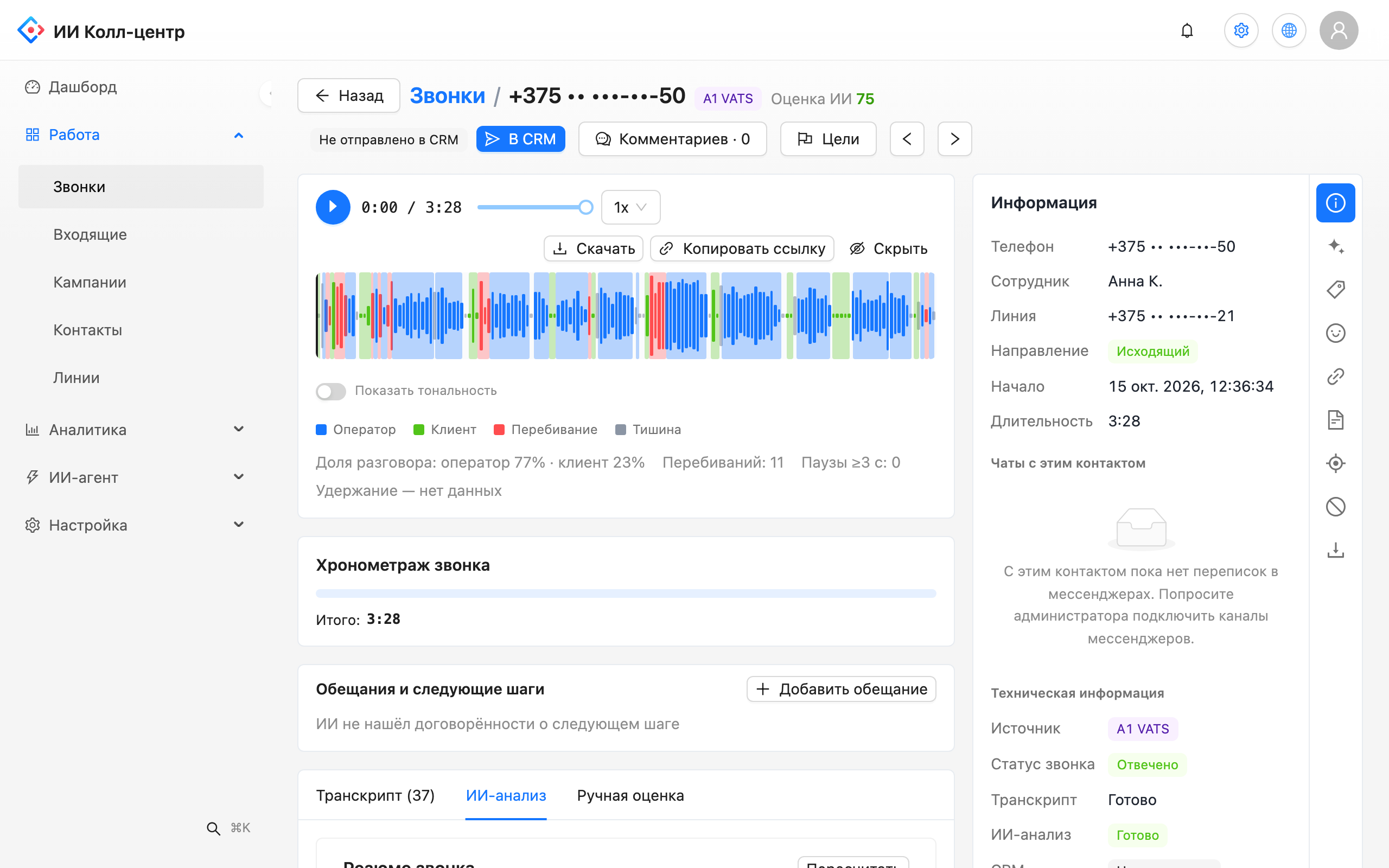
Even an hour-long call is reduced to a short summary you can skim in a minute.
How to teach the system your words
A generic transcript often stumbles on what matters most to you: brand, product and service names. Leksta has two tools for that.
- Speech glossary. You add the names the transcript must recognise correctly. The list can be imported and exported as a CSV file, and changes can be checked on a test recording.
- Keyword dictionary. Terms that matter to your team are highlighted in every transcript. A supervisor sees at once where price, a promotion or a competitor's name came up.
Besides your own words, the AI surfaces phrases you did not think of: prices, competitors and product names.
What a transcript gives a manager
- Review without listening. Read the chat, find the questionable line, click the time and listen to that fragment only.
- Training on real examples. A good line from a rep can be shown to the team as a model.
- Consistent scores. A scorecard rating rests on a quote from the transcript, not on the reviewer's impression. How to build a scorecard: call quality scorecard.
- A base for analytics. The AI verdict for each call, rep scores and questions to the AI analyst are all built from transcripts.
Where to start
- Connect your PBX (supported systems are listed below) or upload recordings in bulk: a set of files or an archive with a table.
- Add your product and brand names to the glossary.
- Create a dictionary of the terms you want to track: price, discount, competitors.
- Open a few call cards and compare the transcript with the recording.
The list of supported PBX and CRM systems is on the integrations page.
Try Leksta free
Want to see transcripts of your own calls? Try Leksta: 14 days and 120 call minutes free, no card. Upload recordings, and Leksta transcribes them, highlights your terms and shows a summary with quotes.
FAQ
How do I teach the transcript your product names?
Add the names to the speech glossary. You can upload the list as a CSV file and check the result on a test recording. After that the system recognises your brands and products more accurately. Fill the list once and it works for your calls.
How do I find the moment a customer mentioned a price or a competitor?
Create a keyword dictionary: its terms are highlighted in every transcript. The AI also surfaces prices, competitor names and products on its own. Click the time next to a quote and the player jumps to the exact second of the recording.
How can I check a long conversation without listening to all of it?
Open a few calls and compare the transcript with the recording. The summary with quotes shows the essentials, and the time next to each quote links to the place in the recording. Leksta reduces even an hour-long call to a short summary, so a manager reads the summary and listens only to the questionable fragment.